Introduction
The real reason LinkedIn outreach fails is not volume—it’s irrelevance. In a saturated digital environment, decision-makers are bombarded with generic pitches that scream "automation." The moment a prospect senses a template, trust evaporates. However, manual personalization is unscalable; you cannot spend 15 minutes researching every lead if you need to contact hundreds of prospects weekly.
This guide presents the definitive blueprint for solving this paradox: a unified ScaliQ + RepliQ personalization workflow.
This strategy is designed for B2B SDRs, founders, and growth marketers who need to move beyond "Insert First Name" and into deep, context-driven outreach. By combining the deep prospect intelligence of ScaliQ with the hyper-personalized visual capabilities of RepliQ, you can build a pipeline that feels handcrafted but operates on autopilot.
The impact of this approach is measurable. Data consistently shows that advanced personalization can lift reply rates by up to 3x, while incorporating personalized visuals can increase engagement by 40–60%. According to AI personalization research indexed in PubMed, algorithmic tailoring of content significantly enhances user perceived relevance and cognitive processing, leading to higher conversion probabilities.
Below, we break down exactly how to personalize LinkedIn messages at scale using a stack that prioritizes relevance, safety, and results.
Why LinkedIn Personalization Breaks at Scale
The fundamental tension in outbound sales is the trade-off between quality and quantity. Historically, you had to choose: send 1,000 generic messages and annoy 990 people, or send 50 handcrafted messages and miss quota due to lack of volume.
The Effort vs. Volume Trap
Manual research does not scale. An SDR researching a prospect’s recent posts, company news, and hiring trends takes an average of 10–15 minutes per lead. To send 50 meaningful messages, an entire workday is consumed. Conversely, traditional automation tools allow for volume but strip away the nuance required to build rapport.
Fragmented Tool Stacks
Most outreach workflows fail because they are fragmented. You might have data in a CRM, enrichment in a separate tool, and image generation in a third. This disconnect leads to "Frankenstein" messages where data fields don't match the context.
• Data Silos: Prospect data sits in one place, while engagement history sits in another.
• Visual Disconnect: Generic stock images or static PDFs are attached to text that tries to be personal.
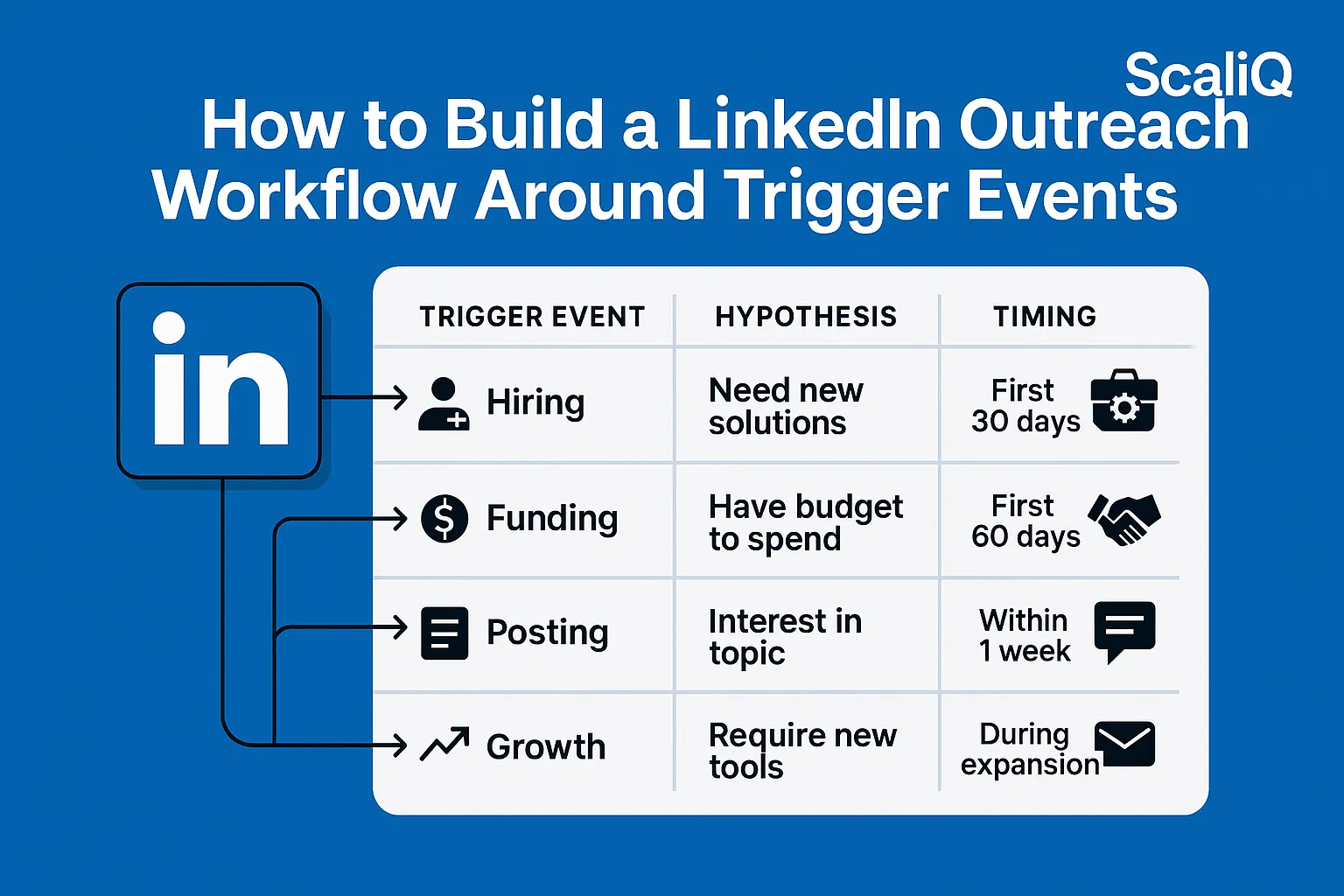
• Execution Lag: By the time the data is collated, the "trigger event" (e.g., a funding round) is old news.
The Cost of Generic Outreach
Generic messages cause low reply rates on LinkedIn outreach. When a message lacks specific context, it is categorized as spam by both the platform's algorithms and the human brain.
To understand why relevance drives replies, we look to the COBRA (Consumer Online Brand Related Activities) framework. This behavioral model suggests that users move from passive consumption to active contribution (replying) only when content triggers a high degree of personal relevance and emotional connection. Furthermore, LinkedIn engagement research found on arXiv highlights that messages aligning with a user's recent professional activity (posting, commenting) see statistically significant spikes in interaction compared to static demographic targeting.
How ScaliQ Generates Deep Prospect Insights Automatically
To solve the relevance problem, you first need a scalable way to gather intelligence. This is where https://scaliq.ai serves as the "brain" of your operation.
Data Signals and Workflow Logic
ScaliQ operates as a dedicated personalization engine designed to replace manual research. Unlike standard databases that provide static fields (Email, Phone, Title), ScaliQ automates the extraction of dynamic AI LinkedIn outreach signals.
Through automated enrichment, the platform scans for:
• Job Role Nuance: Moving beyond "Head of Sales" to understand specific responsibilities.
• Content Activity: Recent posts, articles shared, or comments made on industry threads.
• Company Updates: Funding news, hiring surges, or product launches.
• Activity Signals: Identifying active users versus dormant profiles to prioritize effort.
This manual LinkedIn research automation ensures that every message you send is based on current, actionable reality rather than outdated database entries.
From Raw Data to Personalized Insights
Raw data is useless without interpretation. ScaliQ’s primary advantage over competitors is its ability to convert data points into conversational "hooks."
While tools like Clay offer immense power, they often require complex spreadsheet formulas and heavy technical setup. Conversely, platforms like Apollo provide vast databases but often result in generic "I see you are in sales" messaging.
ScaliQ bridges this gap by synthesizing data into ready-to-use message angles:
• Instead of: "I see you work at [Company]."
• ScaliQ Output: "I saw your team recently launched the [Product Name] initiative you mentioned on Tuesday..."
• Instead of: "Hope you are doing well."
• ScaliQ Output: "Loved your take on [Industry Topic] in the comment section of [Influencer]'s post..."
This creates a seamless ScaliQ RepliQ workflow where the "brain" (ScaliQ) feeds high-quality context to the "face" (RepliQ).
How RepliQ Creates Hyper‑Personalized Visuals That Boost Engagement
Once you have the text hook, you need to stop the scroll. Text-only inboxes are crowded; visual inboxes are an opportunity.
Why Visual Personalization Works
Human brains process images 60,000 times faster than text. When a prospect sees an image containing their own website, name, or profile picture, it triggers a "Pattern Interrupt."
Studies on generative AI social media usage indicate that visual personalization can lift engagement rates by 40–60%. The psychological driver is the "Cocktail Party Effect"—we are hardwired to notice our own names and likenesses in a crowded room (or inbox).
What RepliQ Personalizes
RepliQ allows you to scale personalized LinkedIn images without using Photoshop for every lead. It uses dynamic templates that act as containers for the data ScaliQ provides.
You can create:
• Website Screenshots: Automatically capture the prospect’s landing page and overlay a chat bubble discussing their specific value proposition.
• Personalized Videos/GIFs: A scrolling capture of their LinkedIn profile or company news page.
• Creative Metaphors: A coffee cup with their name on it, or a billboard featuring their company logo.
Competitors like Lemlist pioneered this space, but often lack the deep data enrichment integration required for complex B2B sales. RepliQ excels by taking the granular data signals and rendering them into dynamic visual personalization assets instantly.
Step‑by‑Step LinkedIn Personalization Workflow (ScaliQ → RepliQ → Outreach)
This section outlines the exact step by step LinkedIn personalization workflow to unify these tools.
Step 1 — Prospect Data Enrichment in ScaliQ
Begin by defining your Ideal Customer Profile (ICP) within ScaliQ.
1. Input Criteria: Upload your lead list or define search parameters (industry, headcount, technology used).
2. Activate Signals: Select which data points matter. For a sales offer, prioritize "Hiring" or "Recent Funding." For a partnership offer, prioritize "Content Activity."
3. Generate Hooks: Use ScaliQ’s AI to write the introductory lines based on the found data., Output Variable: {{icebreaker_hook}}
Step 2 — Generate Personalized Visuals in RepliQ
Now, turn that data into a visual.
1. Select a Template: Choose a RepliQ template that fits your offer (e.g., a "Website Audit" template or a "Social Media Review" template).
2. Map Variables: Connect the data columns from ScaliQ to RepliQ., Map {{prospectwebsite}} to the background screenshot., Map {{firstname}} to the text overlay.
3. Generate Links: RepliQ will produce a unique image URL for every single prospect.
Step 3 — Assemble the Message Sequence
Combine the ScaliQ text hook and the RepliQ visual into a cohesive message.
• The Opener: Use the ScaliQ {{icebreaker_hook}}.
• The Bridge: Connect their situation to your solution.
• The Visual: Insert the RepliQ image to prove you’ve done your homework.
• The CTA: Keep it soft and interest-based.
This structure creates hyper personalized LinkedIn messages that feel bespoke.
Step 4 — Automate the Pipeline
To execute this at scale, you need an outreach platform (like Smartlead, Instantly, or specialized LinkedIn automation tools) to send the messages.
1. Import Data: Upload your CSV containing the ScaliQ hooks and RepliQ image URLs into your outreach tool.
2. Insert Image Tag: Use the custom variable (e.g., ) in your email or LinkedIn message body.
3. Compliance Check: Ensure your daily volume limits are safe. AI LinkedIn outreach automation must mimic human behavior. Do not exceed LinkedIn’s daily connection limits (usually 20–30/day for safe growth).
Step 5 — Test, Optimize, and Scale
Personalization is iterative.
• A/B Test Hooks: Does mentioning "Hiring" perform better than "Recent Post"?
• A/B Test Visuals: Does a website screenshot outperform a personalized text image?
• Monitor Reply Rates: If replies drop, your data might be outdated, or your targeting too broad.
Real Examples, Templates, and Optimization Tips
Before/After Message Examples
The Generic Approach (Failure):
The ScaliQ + RepliQ Approach (Success):
3 Ready-to-Use AI Personalization Templates
1. The "Content Admirer" Template
• Subject: Your thoughts on [Topic]
• Body: {{scaliqpostcommenthook}}. It got me thinking about how [Company] handles [Pain Point]. I mocked up this idea for you: {{repliqimage_url}}.
2. The "Website Audit" Template
• Subject: Quick look at [Company] site
• Body: Hi {{firstname}}, checking out [Company]'s site and noticed you're using [Competitor Tech]. We actually help users of [Competitor Tech] save 20%. See the comparison here: {{repliqcomparisoncharturl}}.
3. The "Milestone" Template
• Subject: Congrats on the Series B!
• Body: Saw the news about the funding, {{firstname}}. Huge move. Usually, this means aggressive hiring. I created this candidate sourcing workflow for you: {{repliqworkflow_image}}.
Troubleshooting and Common Mistakes
• Over-Personalization: Don't get creepy. Stick to professional data (LinkedIn activity, company news), not personal Facebook photos.
• Broken Images: Always send a test batch to ensure the image links render correctly in the inbox.
• Complexity: Keep the workflow simple. If you have 15 steps, it will break. The scalable LinkedIn personalization process should be robust and linear.
Tools, Resources, and Future Trends in AI Personalization
The landscape of AI outreach tools is shifting toward autonomous agents. While current workflows require human setup, the future of LinkedIn personalization involves AI agents that autonomously research, draft, generate visuals, and engage in back-and-forth conversation.
However, for now, the competitive advantage lies in Unified Pipelines. The gap in the market is currently filled by integrating best-in-class point solutions:
• Intelligence: ScaliQ (Data & Context)
• Visuals: RepliQ (Engagement)
• Delivery: Smartlead/Instantly (Infrastructure)
By mastering this stack today, you future-proof your outreach against the rising tide of AI-generated spam.
Conclusion
The era of "spray and pray" is over. To succeed in modern B2B sales, you must respect the prospect's time by delivering value immediately.
The ScaliQ + RepliQ personalization workflow offers the definitive blueprint for achieving this at scale. By leveraging ScaliQ to uncover why you should reach out and RepliQ to visualize how you can help, you transform cold outreach into warm conversations.
The math is simple: Deep Insights + Personalized Visuals = Scalable Relevance.
Don't wait for your competitors to adopt this workflow. Start building your personalized pipeline today.