Introduction
For most outbound teams, the "modern" sales stack is a mess. It typically looks like a digital assembly line held together by duct tape: one tool for scraping, another for email finding, a third for verifying data, a CRM for storage, and finally, separate platforms for LinkedIn automation and email sequencing.
This fragmentation kills performance. Data decays between steps, manual list building eats up valuable selling time, and disconnected workflows lead to unsafe, robotic behavior on LinkedIn. The promise of automation was supposed to liberate sales teams, not burden them with administrative overhead.
Imagine instead a unified automation engine—a system that autonomously connects Google Maps sourcing, real-time enrichment, safe LinkedIn messaging, and email sequencing into a single, continuous workflow. This is not just about saving time; it is about building a predictable revenue machine.
This guide delivers a systems-level blueprint for constructing an advanced, fully automated LinkedIn lead engine using ScaliQ and NotiQ. We will move beyond basic list building to explore how integrated orchestration solves the fragmentation problem, ensures compliance, and drives higher reply rates through multichannel outbound strategies.
Why Traditional Outreach Stacks Break
The average B2B outbound team relies on a stack of 5–8 disconnected tools to launch a single campaign. You likely have a subscription for a database (like Apollo or ZoomInfo), a separate scraper for LinkedIn or Google Maps, an email verification tool, a sequencing platform (like Lemlist or Smartlead), and perhaps a browser extension for LinkedIn actions.
This "Frankenstein" approach creates critical points of failure. When data moves from a scraper to a CSV and then to a sequencer, it loses context. Personalization becomes generic because the sequencer doesn't "know" where the lead came from or what triggered the outreach. Furthermore, managing safety limits across different tools is nearly impossible, increasing the risk of account restrictions.
Unlike competitors that force you to stitch these layers together manually, ScaliQ acts as the system-level orchestrator, solving fragmentation by unifying the workflow from the moment a lead is sourced to the final follow-up message.
The Data Fragmentation Problem
The biggest silent killer of campaign performance is data fragmentation. In a traditional stack, sourcing and enrichment are isolated events. You scrape a list on Monday, enrich it on Tuesday, and launch the campaign on Friday. By the time your email hits the inbox, the data may already be stale.
More importantly, most stacks rely on a single data source. They miss the high-signal potential of combining datasets. For example, pairing the hyper-local, operational data from Google Maps with the professional identity data from LinkedIn creates a robust profile that neither source can offer alone. Without a unified engine to merge these signals, your outreach lacks the depth required to engage sophisticated buyers.
The Execution Fragmentation Problem
Even with perfect data, execution often fails because sequencing tools rarely integrate with real-time enrichment or LinkedIn actions. A standard sequencer simply blasts emails at set intervals. It cannot pause a sequence because a prospect just posted on LinkedIn, nor can it dynamically change the email copy based on new data found during the campaign.
True multichannel outbound requires unified timing and context. If a prospect accepts a LinkedIn connection request but doesn't reply, the subsequent email should acknowledge that connection immediately. Disconnected tools cannot execute this logic, resulting in disjointed communication that feels robotic and lowers reply rates.
Risk Exposure From Unsafe Automation
Fragmentation also leads to dangerous automation practices. When your scraper doesn't talk to your automation tool, you risk hitting profiles too aggressively. Common mistakes include high-volume page visits immediately followed by connection requests, or failing to warm up accounts before scaling.
To maintain longevity, you must adhere to strict safety standards. According to LinkedIn community safety guidelines, maintaining authentic, respectful, and trustworthy interactions is paramount. Automation that mimics spammy, high-velocity behavior violates these principles. A unified engine prevents this by enforcing global safety limits across all channels, ensuring your outreach remains compliant and human-like.
The Anatomy of an Automated LinkedIn Lead Engine
Building a reliable engine requires a shift in thinking. Instead of "running campaigns," you are "engineering a pipeline." A fully automated LinkedIn lead engine removes manual hand-offs, creating scalable predictability.
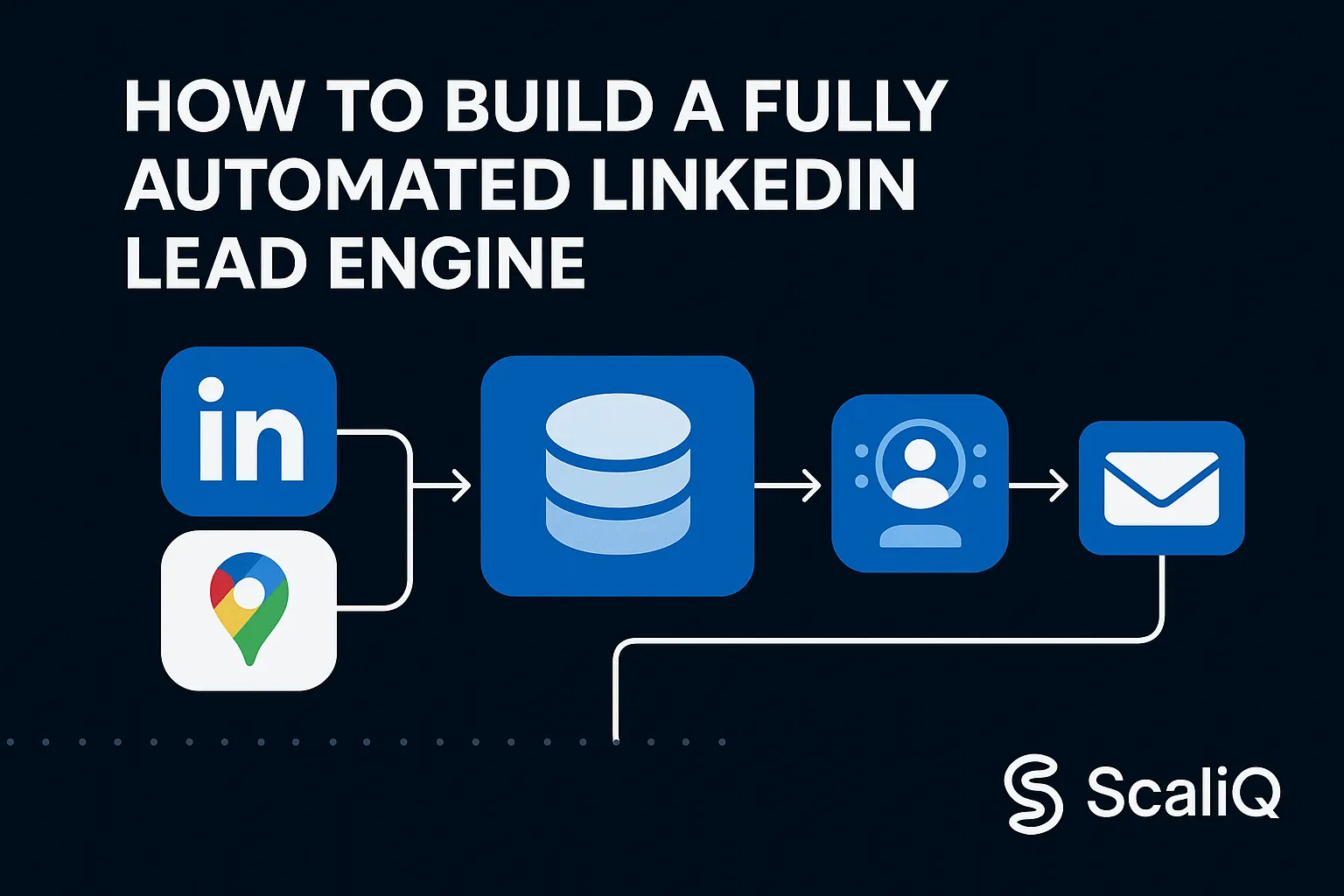
The architecture consists of four distinct layers that flow into one another: Sourcing, Enrichment, Qualification, and Outbound.
Component 1 — Sourcing Layer
The engine begins with high-quality inputs. The goal is to cast a wide net over relevant data sources, such as Google Maps for local businesses, LinkedIn Search for professionals, or niche directories for specialized industries.
In this architecture, NotiQ serves as the ingestion and scraping layer. It monitors these sources for new entities that match your criteria and pulls them into the system automatically. Rather than manually exporting CSVs, NotiQ feeds raw leads directly into the pipeline, ensuring a constant supply of fresh prospects.
Component 2 — Real‑Time Enrichment Layer
Once a lead enters the system, it must be enriched. Automated enrichment goes beyond finding an email address; it involves gathering firmographics, website signals, and technology stacks.
Unlike batch enrichment tools (like Clay or Apollo) where you process static lists, a unified engine performs enrichment in real-time. As soon as NotiQ ingests a lead, the system queries multiple databases to flesh out the profile. This ensures that every message sent is based on the most current data available, maximizing relevance.
Component 3 — Filtering & Qualification Layer
Not every sourced lead is a good fit. The third layer applies AI rules and Ideal Customer Profile (ICP) filters to qualify prospects automatically.
ScaliQ automates these decisions by analyzing the enriched data. You can set negative signals (e.g., "exclude companies with < 5 employees" or "exclude generic Gmail addresses") to filter out bad fits before they ever reach the outreach stage. This automated prospecting layer protects your domain reputation and saves money by ensuring you only engage with high-value targets.
Component 4 — Unified Outbound Layer (LinkedIn + Email)
The final layer is where the action happens. This is the orchestration logic that manages triggers, delays, and personalized sequences across channels.
A unified outbound layer ensures that LinkedIn messages and emails work in harmony. If a prospect replies on LinkedIn, the email sequence stops automatically. If they open an email three times but don't reply, the system can trigger a gentle nudge on LinkedIn. This context-aware orchestration dramatically improves reply rates compared to siloed blasting.
Using Google Maps Data for Scalable Prospect Sourcing
Google Maps is one of the most underutilized yet high-quality data sources for B2B lead generation, particularly for agencies targeting local businesses, retail, real estate, or service providers. It offers ground-truth data that professional networks often lack.
Why Google Maps Outperforms List Providers
Database providers often suffer from data decay—companies close, move, or change phone numbers, and databases take months to update. Google Maps, however, is updated constantly by business owners and users.
For hyper-localized prospecting, Google Maps is unbeatable. It allows you to target businesses based on exact geographic coordinates, review counts, and operational status. While competitors rely on generic industry codes, a Google Maps-led strategy allows you to find "coffee shops in Austin with more than 4 stars," providing a level of intent and quality that static lists cannot match.
How to Scrape Google Maps Safely & Reliably
Scraping public data from Google Maps must be done responsibly. Using NotiQ’s scraping workflows allows you to extract public business information—names, addresses, websites, and phone numbers—at scale without violating privacy norms.
Reliability is key. You must respect throttle limits to avoid IP bans and ensure data accuracy. Furthermore, all data extraction should align with ethical standards. Referencing LinkedIn Responsible AI principles, automation should be used to enhance productivity while respecting user privacy and platform integrity. We strictly advocate for scraping only publicly available business data and verifying it before outreach.
Connecting Google Maps Data to LinkedIn Profiles
The magic happens when you bridge the gap between a Google Maps entity and a LinkedIn decision-maker. The workflow looks like this:
1. Source: Extract business domain and name from Google Maps via NotiQ.
2. Enrich: Use the domain to identify key decision-makers (e.g., Owner, CEO, Marketing Manager).
3. Match: Find the specific LinkedIn profile URL associated with that decision-maker.
4. Engage: Launch a LinkedIn + Email sequence.
This process transforms a generic business listing into a direct line of communication with a human stakeholder.
Safe LinkedIn Automation & Multichannel Sequencing
Automation is powerful, but it carries risk if mismanaged. To build a sustainable engine, you must prioritize safety and human-like behavior.
Safe LinkedIn Action Rules
LinkedIn monitors account activity for bot-like behavior. To stay safe, your engine must adhere to strict daily limits. A safe baseline for most warmed-up accounts is 20–30 connection requests and 40–60 messages per day.
Crucially, these actions should not happen in a burst. Smart delays and randomized patterns are essential. The system should mimic a human user: browsing a profile, waiting a few minutes, sending a request, and then pausing. Always align your strategy with LinkedIn member safety policies, which prohibit the use of software that abuses the platform or harasses members. Compliance isn't just a rule; it's a strategy for longevity.
Structuring High‑Reply Multichannel Sequences
Multichannel outreach delivers 2–3x higher reply rates than single-channel campaigns because it meets prospects where they are. A typical high-performing sequence might look like this:
• Day 1 (LinkedIn): View Profile + Send Connection Request (blank or low-friction note).
• Day 2 (LinkedIn): If connected, send a value-first welcome message.
• Day 3 (Email): Send an email referencing the LinkedIn connection ("Hi [Name], just connected with you on LinkedIn...").
• Day 6 (LinkedIn): Share a relevant resource or case study.
• Day 9 (Email): Follow up with a different angle or soft breakup.
The key is transition logic. The email references the LinkedIn activity, creating a cohesive narrative rather than disjointed noise.
Avoiding Automation Footprints
Platforms look for technical "footprints" to identify bots. These include identical browser fingerprints, impossible click speeds, or running 24/7 without sleep.
ScaliQ handles this by managing browser sessions that rotate user agents and IP addresses safely. It simulates "working hours" (e.g., pausing activity at night and on weekends) and navigates the UI just as a human would. This sophisticated approach drastically reduces the risk profile compared to older, extension-based tools that inject code directly into the browser page.
How ScaliQ + NotiQ Create a Fully Unified Outbound System
When you combine ScaliQ and NotiQ, you move from a fragmented stack to a unified "Outbound Operating System."
Unified Data Flow Architecture
In this setup, data flows seamlessly through a single orchestrated graph. NotiQ handles the ingestion (Sourcing), passing structured JSON data directly to ScaliQ. ScaliQ then acts as the brain, triggering enrichment, filtering the leads, and dispatching the outreach tasks.
The workflow logic resembles a modern software pipeline: Source (NotiQ) -> Trigger (New Lead) -> Action (Enrich) -> Condition (Is Qualified?) -> True (Add to ScaliQ Sequence)
This real-time syncing eliminates the need for CSV uploads and ensures that your pipeline is always full.
Eliminating Tool Fragmentation
Using ScaliQ + NotiQ replaces the need for separate subscriptions to Apollo, a scraper, an email verifier, and a sender like Instantly. This consolidation reduces software costs significantly. More importantly, it improves reliability. When one tool controls the entire process, you eliminate the "integration tax"—the errors and data loss that occur when moving data between incompatible platforms.
Real-Time Personalization With AI
Because the system holds all the data—from the Google Maps review count to the LinkedIn bio—it can generate highly personalized messages at scale. AI agents within the system can write unique opening lines based on specific data points, such as mentioning a recent business update found on Maps or a shared skill on LinkedIn. This level of granularity is only possible when sourcing and sending happen in the same ecosystem.
Case Studies & Real‑World Examples
Case Study 1 — Hyper‑Local Google Maps → LinkedIn → Email
A digital marketing agency wanted to target high-end dental clinics in California.
• Strategy: They used NotiQ to scrape Google Maps for clinics with 4.5+ stars and "cosmetic" in their name.
• Enrichment: The system automatically found the "Owner" or "Principal Dentist" on LinkedIn.
• Execution: A ScaliQ sequence sent a LinkedIn request mentioning their specific clinic location, followed by an email with a case study on cosmetic dentistry marketing.
• Outcome: The campaign achieved a 14% reply rate and generated 25 qualified calls in the first month, entirely on autopilot.
Case Study 2 — Scaling to Thousands of Prospects/Month
A SaaS company needed to scale outreach to HR directors without hiring more SDRs.
• Strategy: They built a continuous ingestion pipeline using LinkedIn Search parameters.
• Logic: ScaliQ filtered for companies using specific HR tech stacks (identified during enrichment).
• Execution: The system managed 5 sender accounts, distributing volume safely.
• Outcome: They consistently contacted 3,000 prospects per month with zero account bans, maintaining a steady pipeline of 40+ demos monthly.
Tools, Templates & Resources
To get started, you need the right assets.
• Enrichment Rules: Always verify emails (catch-all vs. valid) and filter out non-decision makers.
• Automation Recipes: Set up "If Connected -> Wait 4 Hours -> Send Message" to avoid appearing desperate.
• Personalization: Use liquid syntax to insert dynamic variables like {{company_name}} or {{location}}.
For advanced personalization strategies and templates that go beyond the basics, check out the resources at Repliq, which offer deep dives into crafting messages that convert.
Future Trends in Multichannel Outbound
The future of outbound is autonomous. We are moving away from static sequences toward "Agentic Workflows." Soon, AI agents will not just follow a sequence but will make dynamic decisions: "This prospect posted about hiring yesterday; I will switch them to the 'Recruitment' sequence."
We will also see a rise in signal-based triggers. Instead of cold outreach based on static lists, engines will trigger outreach based on real-time events—funding news, job changes, or technology installs—detected instantly by the sourcing layer.
Conclusion
The era of fragmented, manual outbound is ending. Relying on disconnected tools results in poor data, safety risks, and low conversion rates. By building a fully automated LinkedIn lead engine with ScaliQ and NotiQ, you create a unified system that sources, enriches, and engages prospects with superhuman consistency.
This is your opportunity to stop "doing" lead generation and start "engineering" it. Remove the friction, ensure compliance, and let the engine drive your growth.